|




| |
(Presented
here with his full consent)
MASTER
ELECTRONICS
Master Electronics buys and sells
electronic parts. They also do repair work. Currently, they employ a manual
system.
1 The Functions Of The Current System
Master Electronics supports three
basic transactions:
 | the sale of goods to the
public
| the use of parts in
installations
| buying goods from external
suppliers
| | |
1.1 The Sale Of Goods To The
Public
| the customer goes to
reception and asks for the goods he/she wants
| an invoice is completed with
the details obtained from the customer and product detail obtained from a
master stock list
| the goods are retrieved from
the store and given to the customer with the completed invoice
| the customer then pays the
invoice amount and receives the original invoice
| the duplicate invoice is
used to update the master stock list
| | | | |
1.2 The Use Of Parts In
Installations
| the customer goes to
reception and ask for the installation of certain parts
| the availability of the
stock is checked against the master stock list and if available, the top
part of the jobcard is completed with the customer information
| the half-completed jobcard
is sent to the workshop where a technician will do the installation and
complete the second part of the jobcard (work done and parts supplied, as
well as hours worked and charge per hour)
| the jobcard is sent back to
reception who will complete the bottom part of the jobcard (the total) and
draw up an invoice
| the customer will collect
his/her car and pay the invoice amount
| the jobcard is used to
update the master stock list
| | | | | |
1.3 Buying Goods From
External Suppliers
| if stock was bought and
received that is not already on the master stock list, a new stock card is
made up for it
| if stock was bought and
received that is already on the master stock list, the current stock card
is updated
| |
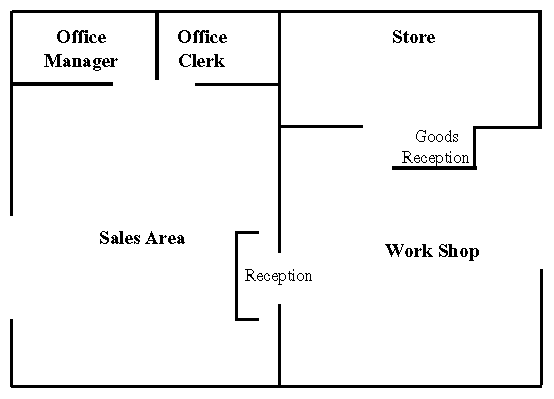
1.4 Physical Layout Of
Master Electronics
2 The Documents Used In The Current System
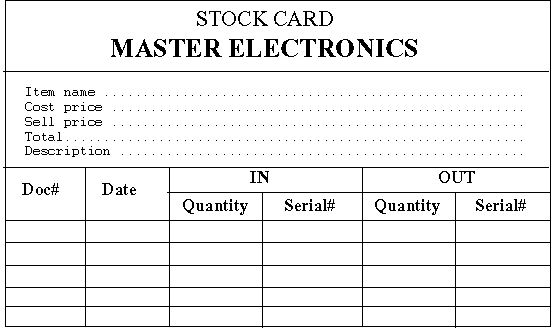
2.1 The Stock Card
|
Field
|
Description
|
|
Item Name
|
the name of the stock item that will uniquely identify it
|
|
Cost Price
|
the cost of the stock item
|
|
Sell Price
|
the price at which the stock item will be sold
|
|
Total
|
the total quantity on hand
|
|
Description
|
more detailed description of the stock part in accordance
with the Item Name
|
|
Doc#
|
if stock was bought then this number would be the
document number received with the goods from the external
supplier
|
|
|
if stock was sold to a customer then this number would be
the invoice number
|
|
|
if stock was used in an installation then this number
would be the jobcard number
|
|
Date
|
date the goods were receive/sold
|
|
IN Quantity
|
the number received
|
|
IN Serial#
|
the serial number of the item (if applicable) that was
received
|
|
OUT Quantity
|
the number sold
|
|
OUT Serial#
|
the serial number of the item (if applicable) that was
sold
|
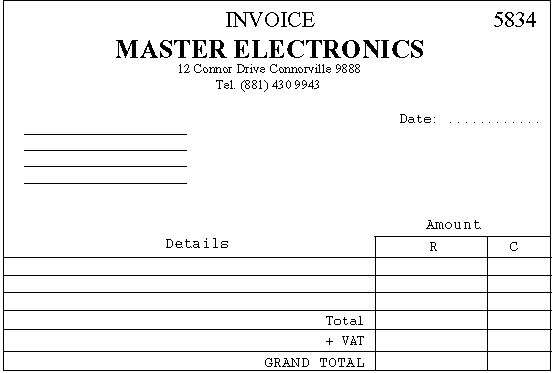
2.2 The Invoice
|
Field
|
Description
|
|
Invoice
number
|
a unique
number given to each invoice made out
|
|
Date
|
date the
invoice is made out
|
|
Customer
Details
|
name and
address of the customer
|
|
Details
|
description
of the part(s) bought or the work done
|
|
Amount
|
amount of
the part(s) or work done
|
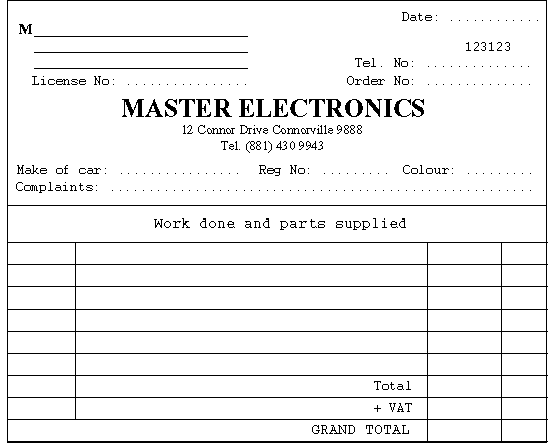
2.3 The Jobcard
|
Field
|
Description
|
|
Customer
Details
|
customer's
name and address
|
|
Telephone
Number
|
customer's
telephone number
|
|
Date
|
date the
jobcard is made out
|
|
Jobcard
Number
|
unique
number for each jobcard
|
|
Licence No
|
optional
radio/TV license
|
|
Order No
|
optional
Order Number from company
|
|
Make of
Car
|
make of
the customer's car
|
|
Reg. No
|
registration
number of the customer's car
|
|
Colour
|
colour of
the customer's car
|
|
Complaints
|
a
description of what must be installed/repaired
|
3 User Requirements For the Computerized System
3.1 Queries
| display the stock card on
screen for a given item (query on ItemName)
| display the details for a
specific serial number on screen (query on ItemName and then on Serial#)
| display when an item was
last sold (query on ItemName)
| | |
3.2
Reports/Print-outs/Screen Display
| print the stock card for an
item (query on ItemName)
| print a stock list with the
option for a list of stock with serial numbers or a list of stock without
serial numbers, or both
| the list should include the
total number of stock as well as the total cost price and sales price
| print an aged analysis
report for all items in stock with serial numbers
| for a given serial number,
print the item name, description, and the document number and date when it
was bought/sold
| | | | |
3.3 The Sale Of Goods To The
Public
| type in the customer name,
address and telephone number
| type in the item name of
each of the items that the customer bought
| the system will insert the
date of purchase and the amount of each part that was bought, and
calculate the total
| the system will assign a
unique number to each invoice
| the system will then print
out an invoice for the customer and update the stock
| if an item has a serial
number, the serial number must also be printed
| | | | | |
3.4 The Use Of Parts In
Installations
| type in the top part of the
job card
| the system will print out a
complete jobcard with the top part completed
| if an item has a serial
number, the serial number must also be printed
| after receiving the jobcard
from the workshop, type in the information
| the system will use this
information to update the stock
| the system will print an
invoice for the customer
| | | | | |
3.5 Buying Goods From
External Suppliers
| type in the item name and
cost price
| type in the document number
of the document that came with the goods
| type in the date and the
number of item that was received as well as the serial number of each of
the items (if applicable)
| the system will then update
the stock
| | | |
3.6 Miscellaneous
| items with serial numbers
must have a minimum stock level
| provision is made to change
the item name, cost price, mark-up, description and minimum stock level
(if applicable) for each item by management
| if the minimum stock level
of an item is reached, the system must issue a warning by displaying an
error message as well as a hard copy message
| the VAT percentage will be a
global variable that can be changed by management
| | | |
3.7 Item Name Break Down
The Item Name of a stock item is
composed of the following sub-fields:
|
Item Name
|
|
Field
|
Type
|
Size
|
Description
|
|
Product Class
|
Alphanumeric
|
6
|
The class
of the product. Predefined classes include:
|
CARCD -
car radio/CD player
|
CARRAD -
car radio/cassette player
|
CARSPK -
car speakers
|
CDPLAY -
standalone CD player
|
COLTV -
color TV
|
HIFI
|
MONTV -
mono TV
|
RADIO -
standalone radio
|
SPEAKR -
standalone speakers
| | | | | | | | |
|
|
Manufacturer
|
Alphanumeric
|
5
|
The name
of the product manufacturer. Predefined names include:
|
AIM
|
LG
|
PANAS -
Panasonic
|
PHILI -
Philips
|
SAMSU -
Samsung
|
SONY
|
YAMAH -
Yamaha
| | | | | | |
|
|
Model
|
Alphanumeric
|
5
|
The first
5 digits of the model number
|
|
Extra
|
Alphanumeric
|
5
|
Extra
digits to help identify the product
|
The values for Product Class and
Manufacturer will be decided on and assigned by management. The values shown in
the table above are some of the default values decided on and used in the
current Master Electronics system. This information must be stored in a separate
file.
When a stock item is bought from a
supplier, the system must first determine if it can be classified according to
the current Product Class and Manufacturer values. If not, then a new Product
Class/Manufacturer must be created. No duplicates are obviously allowed.
This information must be used when a
customer wants to purchase a product, or when a product will be used in an
installation/repair.
4 Design Goals
4.1 General
| data entry should be made as
easy as possible for increased data entry speed
| since most computerized
programs require the user to press enter/return after entering most data,
the same approach is taken here, at the cost of more work in getting
information on the screen and accepting data from the user
| a standardized screen and
menu layout must be used to make the user familiar with the system as soon
as possible
| the user only has to TYPE in
the number of the menu option he/she wants to execute
| invoice and jobcard number
must be generated automatically by the system
| dynamic linking and code
reuse must be used
| defensive programming
techniques MUST be used
| | | | | | |
4.2 Sales To The Public
| on each field that
verification is needed, the user must be given the opportunity to
terminate the currently entered item; these fields include:
| item name
| quantity
| the user must be given the
opportunity to accept the currently entered item, before entering another
item, since no update to the files will take place until the user has seen
the complete invoice on screen, at which time it would be more difficult
to add, change or delete an item to/from the invoice
| updates to the files should
only take place AFTER the user has accepted the complete invoice
| | | | |
4.3 Installations
With the current manual system,
reception completes the top part of the jobcard with the customer information
supplied. The work that must be done is written down in the complaints section
on the jobcard. This jobcard is then given to the technician who must check
which item to install, if it is available, and if applicable, which serial
number to use. This can lead to data inconsistency.
| after reception has
completed the top part of the jobcard, the system must prompt the user to
enter the data for the item(s) the user wants installed
| the system will check for
stock availability, and if the minimum stock level (if applicable) is
exceeded
| if the item has serial
numbers, the system will check which parts are available and then reserve
that part for the jobcard, and update the database accordingly
| a jobcard must the be
printed out that contains the customer information, as well as the item
name(s) to use along with the serial numbers, if applicable; space must be
provided for the technician to fill in the hours he/she work along with
the charge
| such a jobcard will be seen
as open
| if an open jobcard is
received from the technician, reception must type in the jobcard number
and the information supplied by the technician (hours worked and charge)
| the system will verify that
the jobcard number does exist, and is open
| if everything checks out, an
invoice will be printed for the customer
| the same data entering
technique used for sales should be used to get the item information from
the customer
| | | | | | | | |
4.4 Receiving Goods From Suppliers
| to speed up data entry, the
user will not be prompted to accept each item as it is entered
|
4.5 Field Definitions
|
Field
|
Type
|
Size
|
|
Address
|
|
|
|
Street
|
Alphanumeric
|
20
|
|
City
|
Alphanumeric
|
15
|
|
State
|
Alphanumeric
|
25
|
|
ZipCode
|
Alphanumeric
|
10
|
|
Customer
|
|
|
|
Name
|
Alphabetic
|
20
|
|
Surname
|
Alphabetic
|
20
|
|
Address
|
|
|
|
Telephone
Nr
|
Alphanumeric
|
15
|
|
Date
|
Numeric
|
8
|
|
Jobcard/Invoice
Number
|
Numeric
|
8
|
|
Stock
|
|
|
|
Item Name
|
Alphanumeric
|
21
|
|
Item
Description
|
Alphanumeric
|
50
|
|
Item Cost
Price
|
Numeric
|
9(7).99
|
|
Item Mark
Up
|
Numeric
|
9(1).99
|
|
Total Qty
on hand
|
Numeric
|
7
|
|
Document
Nr
|
Alphanumeric
|
15
|
|
Quantity
|
Numeric
|
6
|
|
Serial
Number
|
Alphanumeric
|
15
|
|
Amount
Total
|
Numeric
|
9(8).99
|
|
VAT
|
Numeric
|
9(1).99
|
|
JobCard
|
|
|
|
License Nr
|
Alphanumeric
|
20
|
|
Make of
Car
|
Alphanumeric
|
20
|
|
Reg. Nr
|
Alphanumeric
|
15
|
|
Colour
|
Alphanumeric
|
15
|
|
Complaints
|
Alphanumeric
|
50
|
|
Order Nr
|
Alphanumeric
|
15
|
5 Example
The following item will be used as
an example to illustrate the current process:
The item is a Panasonic Color TV
with a remote control, model P-2000. The cost price of the item is R2500-00. On
the 1st of January 2000, Master Electronics purchased 5 of these items. These
items do have serial numbers. Management decided to sell these items at cost
plus 10%. VAT is 14%. The serial numbers of the five items are: PAN#111-1,
PAN#111-8, PAN#111-10, PAN#122-1, PAN#122-3.
5.1 Buying The Goods From The External Supplier
All five the items arrived as one
order and the supplier sent only one sales/invoice document. The document number
is: GI20000101A10
This item is not already on stock,
thus a new stock card must be created for it. The Product
Class and Manufacturer information are already available. Thus the Item Name
can be created as follows:
|
Field
|
Value
|
|
Product
Class
|
COLTV
|
|
Manufacturer
|
PANAS
|
|
Model
|
P-200
|
|
Extra
|
00001
|
If a field is not filled completely
by a value, zeros (0) should be used. Thus, the final Item
Name will be: COLTV0PANASP-20000001
The Item Description
will be: Panasonic Color TV with remote (model P-2000)
The Sell Price
will be: Cost Price + 10% = 2750-00
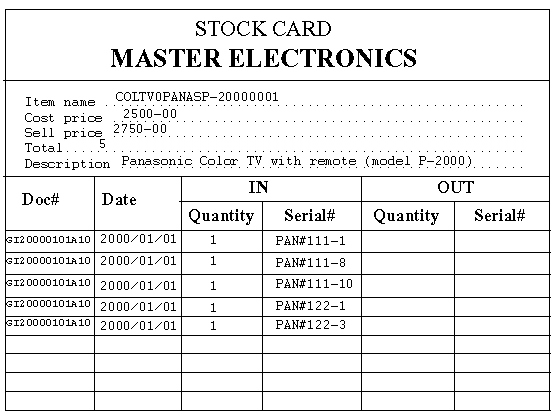
Since the five items were received
on the same day with the same document number and the serial numbers are known,
the IN part of the Stock Card can be completed.
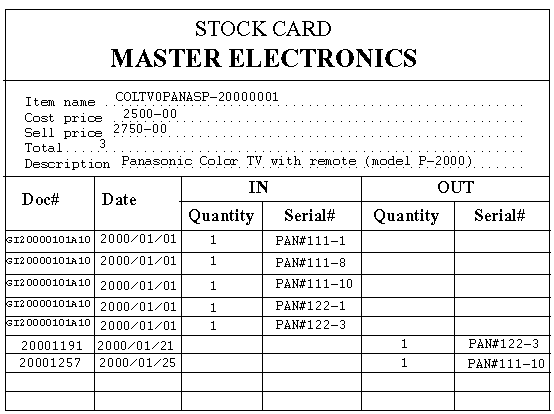
At this stage, the Stock Card for
this item will look as follows:
5.2 Sales To The Public
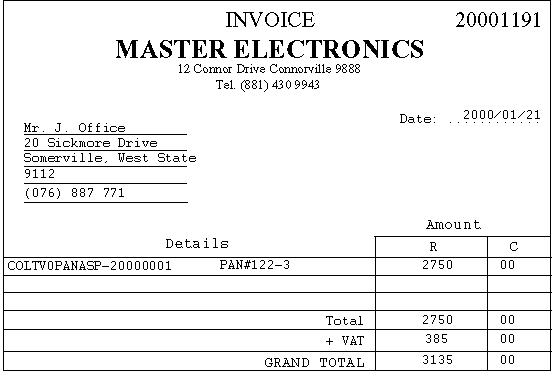
On the 21st of January,
2000, a customer buys one of these items. The Serial Nr
of this item is: PAN#122-3.
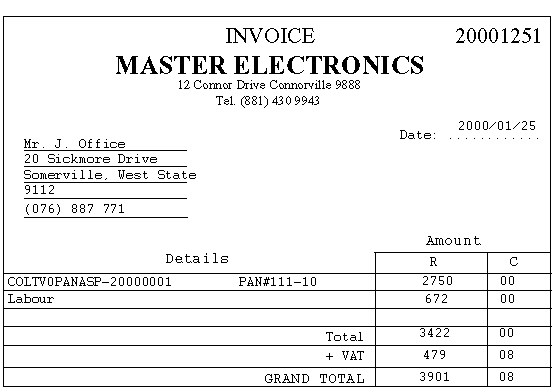
The Invoice will look like this:
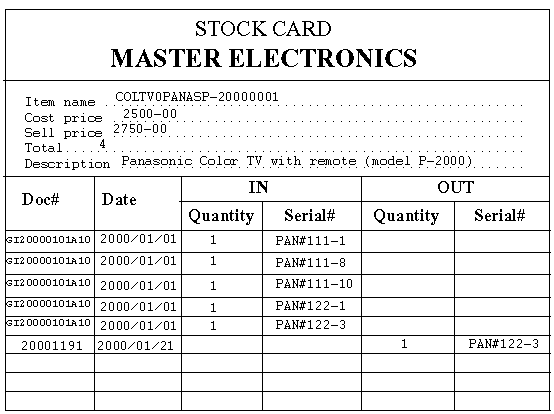
The Stock Card is updated:
5.3 The Use of Parts In Installations
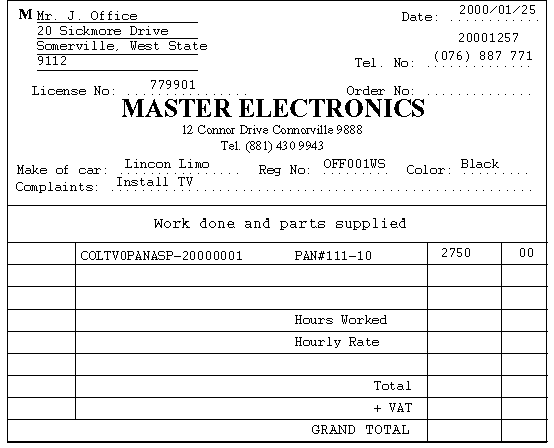
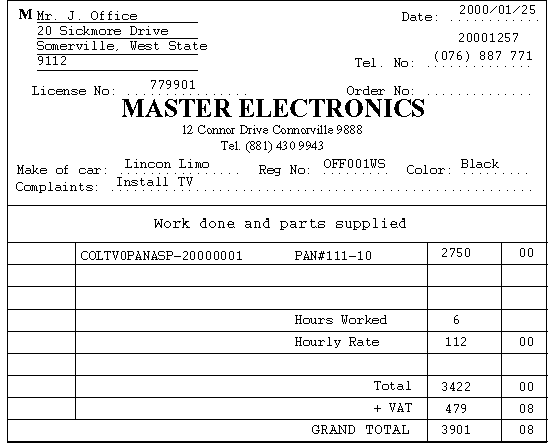
Assume that a customer arrived on
the 25th of January 2000, and asked that one of these items be installed in his
car.
A Job Card will be created:
The technician installs the TV and
completes the rest of the Job Card:
The Stock Card will be updated:
An Invoice will be generated:
6 Notice
All products mentioned
in this project are trademarks of their respective
owners/manufacturers. Specific examples are fictional and do not
represent any actual products. The use of these product names do not
carry the endorsement of the author or Technikon Free State.
|


![]=[annes](../../../_borders/Hannes3d.gif)